<?xml version="1.0" encoding="utf-8"?>
<feed xmlns="http://www.w3.org/2005/Atom">

  <title><![CDATA[Adam Dymitruk]]></title>
  <link href="http://www.dymitruk.com/atom.xml" rel="self"/>
  <link href="http://www.dymitruk.com/"/>
  <updated>2012-07-28T16:59:09-07:00</updated>
  <id>http://www.dymitruk.com/</id>
  <author>
    <name><![CDATA[Adam Dymitruk]]></name>
    
  </author>
  <generator uri="http://octopress.org/">Octopress</generator>

  
  <entry>
    <title type="html"><![CDATA[Scripting for Fun]]></title>
    <link href="http://www.dymitruk.com/blog/2012/07/20/scripting-for-fun/"/>
    <updated>2012-07-20T18:16:00-07:00</updated>
    <id>http://www.dymitruk.com/blog/2012/07/20/scripting-for-fun</id>
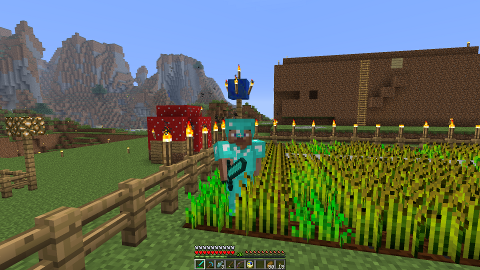
    <content type="html"><![CDATA[<p><img alt="minecraft" src="http://www.dymitruk.com/images/minecraft.png" style="float:left;margin:0 10px 10px 0" markdown="0" />I&#8217;ve been playing minecraft a couple of nights a week for about 40 minutes each time with my son. This seems to be a trend even for very young children. It wasn&#8217;t too long before I found myself running a server so that we could play together with our friends (We even setup a trello board for our missions and projects!). It&#8217;s much more fun to work together and build something. Discovering new places and building contraptions, houses and other things is very stimulating for a young mind - as well as my old mind. This generation has so much more at their disposal.</p>

<p>Since the 2 teams don&#8217;t play very often, it would be nice to get notifications when one goes online so the other can join. The server has a log file that we can inspect. So I came up with this little script that emails the other team when we log in and vice versa. I also made the same for logging off. This is scripting 101, but most people I know are programmers and don&#8217;t neccessairly dabble in bash.</p>

<pre><code>tail -F /srv/minecraft-server/server.log | 
  grep --line-buffered 'adymitruk .\* logged in' | 
  while read line
  do 
    echo "Join me if you can." | 
      mail -s "I just logged in to Minecraft" yourfriend@gmail.com 
  done &amp;
</code></pre>

<p>The minecraft log makes it easy to take actions according to what happens in the game. A line gets written saying who logged in and who logged out. Tailing this log and then grepping for those lines, we can send an email. Here&#8217;s how you can <a href="http://ubuntu-tutorials.com/2008/11/11/relaying-postfix-smtp-via-smtpgmailcom/">set up your server to send via gmail</a>.</p>

<!-- more -->


<h2>The Details</h2>

<h3>tail</h3>

<p>This command will give you the last 10 lines of a file by default. You can change this if you like. The <code>-F</code> option will make this command never return and keep monitoring the file for changes, even when the file ceases to be readable.</p>

<h3>grep</h3>

<p>This is probably the most well known of linux commands. We are going to filter out lines that only match the regex that we provided. In this case it is looking for the log entry when I log in. You can make this more robust by ensuring the format is more strict. The log in minecraft will log any chat conversations, so a user could spam you with email at this point by chatting a pattern that matches up to this.</p>

<p>Grep will also buffer input before passing it along. This is why we provide the <code>--line-buffered</code> option. It makes sure that the buffering is limited to only one line. If you omit this, grep will appear to be stuck and you will only get an email if you manage to empty the buffer by causing the log to grow by a significant amount.</p>

<h3>while</h3>

<p>We make a never ending while loop to continue to consume the lines that are being piped from grep. You can enter the statements on a single line if you like but would need to insert semicolons after the <code>do</code>, <code>mail</code> and <code>done</code> lines.</p>

<h3>mail</h3>

<p>You can email from the command line by piping the message into the mail command. This is what we have done here. Multiple recipients can be listed as well. In this case we just have one.</p>

<h3>background process</h3>

<p>The &amp; at the end tells the shell to run everything in a background process, freeing up the command line for more instructions. More importantly, the process will be running when you log out of the server and log back in again. If this was a more important process, I would run it as a service instead.</p>

<p>We can see these processes with</p>

<pre><code>ps -Af | grep line-buffered -B 1 -A 1
</code></pre>

<p>I&#8217;m looking for some text that was unique and was used to launch the 2nd process in our pipe chain. Since it is the 2nd one, we also want the first and 3rd processes. It&#8217;s highly likely that they will be spawned right after one another and get listed one after the other. So we can ask grep to return one line before and one line after the matched line. We will also get this current grep instance as well when we issue the command but we&#8217;ll ignore that:</p>

<pre><code>adam     21847     1  0 Jul16 ?        00:00:00 tail -F /srv/minecraft-server/server.log
adam     21848     1  0 Jul16 ?        00:00:00 grep --color=auto --line-buffered adymitruk .* logged in
adam     21849     1  0 Jul16 ?        00:00:00 -bash
adam     21853     1  0 Jul16 ?        00:00:00 tail -F /srv/minecraft-server/server.log
adam     21854     1  0 Jul16 ?        00:00:00 grep --color=auto --line-buffered adymitruk lost connection
adam     21855     1  0 Jul16 ?        00:00:00 -bash
adam     21856     1  0 Jul16 ?        00:00:00 tail -F /srv/minecraft-server/server.log
adam     21857     1  0 Jul16 ?        00:00:00 grep --color=auto --line-buffered friend .* logged in
adam     21858     1  0 Jul16 ?        00:00:00 -bash
adam     21862     1  0 Jul16 ?        00:00:00 tail -F /srv/minecraft-server/server.log
adam     21863     1  0 Jul16 ?        00:00:00 grep --color=auto --line-buffered friend lost connection
adam     21864     1  0 Jul16 ?        00:00:00 -bash
</code></pre>

<p>If we don&#8217;t want these to run anymore, we can issue the <code>kill</code> command followed by the process id - it&#8217;s the 2nd column.</p>

<h2>Summary</h2>

<p>Linux is a wonderful operating system and has matured quite a lot. It can be a lot of fun too. Especially now that <a href="http://www.co-optimus.com/article/8643/steam-is-coming-to-linux.html">Steam is going to be rolling out on a Linux platform</a>, we should be seeing more games where we can do fun things like this.</p>
]]></content>
  </entry>
  
  <entry>
    <title type="html"><![CDATA[Filtering by Author Name]]></title>
    <link href="http://www.dymitruk.com/blog/2012/07/18/filtering-by-author-name/"/>
    <updated>2012-07-18T00:46:00-07:00</updated>
    <id>http://www.dymitruk.com/blog/2012/07/18/filtering-by-author-name</id>
    <content type="html"><![CDATA[<p>It&#8217;s unbelievable the kind of attention something simple can get. I&#8217;m still suprised at how many up-votes <a href="http://stackoverflow.com/questions/4259996/how-can-i-view-a-git-log-of-just-one-users-commits">this answer</a> is getting.</p>

<p>In Git, filtering by author name is easy. Most people simply use the name of the committer that they are interested in. However, it&#8217;s a little more powerful due to the fact that the author option on git log is actually interpreted as regex. So for looking for commits by &#8220;Adam Dymitruk&#8221; it&#8217;s easier to just type <code>git log --author="Adam"</code> or use the last name if there more contributors with the same first name.</p>

<p>You can also match on multiple authors by supplying the regex pattern. So to list commits by Jonathan or Adam, you can do this:</p>

<pre><code>git log --author='\(Adam\)\|\(Jon\)'
</code></pre>

<p>However it&#8217;s tricky to exclude commits by a particular author or set of authors using regular expressions as noted <a href="http://stackoverflow.com/questions/406230/regular-expression-to-match-string-not-containing-a-word">here</a>. Instead, turn to bash and piping you can exclude commits authored by Adam by:</p>

<pre><code>git log --format='%H %an' |  # get a list of all commit hashes followed by the author name
  grep -v Adam |             # match the name but return the lines that *don't* contain the name
  cut -d ' ' -f1 |           # from this extract just the first part of the line which is commit ref
  xargs -n1 git log -1       # call git log from that commit stopped after 1 commit
</code></pre>

<p>A limitation of this is that some log options that you would want are not available such as <code>--graph</code> due to the mechanics of calling <code>git log</code> multiple times.</p>

<h2>A Few More Details</h2>

<p>The cut command is treating spaces as delimiters and is only returning the first field which is the sha1 of the commit.</p>

<p>If you want to exclude commits commited (but not necessarily authored) by Adam, you can replace <code>%an</code> with <code>%cn</code>. This has the same effect as using <code>git log --committer=Adam</code> instead of author in the first example but for exclusions.</p>

<p>Don&#8217;t be afraid to split your piped commands onto multiple lines. As long as a line ends with a pipe, bash knows there is more and will prompt for the next line. You can continue to do this until you have written what you want or pasted a multiline snippet from an example online. When you search history, it will be recalled as one line with proper semi-colons inserted if you used while loops or other flow control.</p>
]]></content>
  </entry>
  
  <entry>
    <title type="html"><![CDATA[NDC Oslo]]></title>
    <link href="http://www.dymitruk.com/blog/2012/06/09/ndc-oslo/"/>
    <updated>2012-06-09T23:15:00-07:00</updated>
    <id>http://www.dymitruk.com/blog/2012/06/09/ndc-oslo</id>
    <content type="html"><![CDATA[<h2>Continuous Tests is Free!</h2>

<p><img src="http://www.dymitruk.com/images/mightymoose.png" alt="Mighty Moose logo" /></p>

<p>Last week I was lucky enough to present and attend the Norwegian Developer Conference in Oslo. This was a wonderful event with many excellent presentations and post conference get-togethers. The highlight of this conference for me was the announcement that <a href="http://www.continuoustests.com" title="Continuous Tests">Continuous Tests aka Mighty Moose</a> is now free! If you&#8217;ve been keeping up with the conference on twitter, you may have noticed the controversy that the Azure announcement caused. I also didn&#8217;t like the use of profanity in the keynote and more mentions of Steve Jobs, but that&#8217;s a small part. Aral had me in stitches with all the usability (or there lack of) issues found in our world. My criticism of those 2 things caused Aral to block me on Twitter - I guess some people have thin skin. Don&#8217;t let the Azure slip up take away from an excellent conference. Download all the presentations and watch them.</p>

<!-- more -->


<p>My presentation was about the previous post on this blog – a lesson in branch-per-feature as experienced by one company. I&#8217;ll be reworking the presentation to be less wordy and will post the slides here. The talk is very similar to the one I gave at Vancouver Techfest in late April. I was amazed at the number of people that attended. Presenting at the same time as me was Dan North and I really wish I could have been there for his talk. Beforehand he and I were joking about how we wanted to take our audience to other talks that we thought were better than our own!</p>

<p>As with any conference that I attend, the true benefit is the ability to sit with the attendees and speakers alike over dinner or drinks. I had a chance to catch up with Greg Young, Michael Feathers, Udi Dahan, Dan North and many others.  I met a number of people that I knew already from Twitter such as Rob Conery, Rob Ashton, Ashic, Krzyshtof Kozmic to name a few. There is a number of great Swedes, Danes and Norwegians that I had the pleasure to meet and connect with. The discussions were really insightful and were full of content you just couldn&#8217;t get from a presentation.</p>

<p>On my last day there I took an opportunity to see a little bit of the city and included seeing the Botanical Gardens, Museum of Natural History, Museum of Geology and the Vigeland Statue Park. The botanical gardens and museums were to the east of central station while Vigeland park was to the west. This showed a great contrast between the poor and the well-off in Oslo as you walked the streets.</p>
]]></content>
  </entry>
  
  <entry>
    <title type="html"><![CDATA[Branch-per-Feature]]></title>
    <link href="http://www.dymitruk.com/blog/2012/02/05/branch-per-feature/"/>
    <updated>2012-02-05T22:38:00-08:00</updated>
    <id>http://www.dymitruk.com/blog/2012/02/05/branch-per-feature</id>
    <content type="html"><![CDATA[<h2>The Dymitruk Model</h2>

<p>Following the methodology defined below is the most effective way to leverage the power of Distributed Version Control Systems - specifically Git. This work is the result of an in depth analysis of Continuous Intergration and the notion of <em>responsible</em> Continuous Delivery. The inherent risks that de facto CI and CD introduce are mitigated by what others now refer to as &#8220;The Dymitruk Model&#8221;.</p>

<h2>Features are small</h2>

<p>Old-school branch-per-feature meant that branches were large and long living to avoid having to integrate because it was a pain. This was a vicious circle as the feature would diverge further and further from other features or the mainline. Features should be as atomic as possible and your development process should abide by the <a href="http://en.wikipedia.org/wiki/Open/closed_principle">Open Close Principle</a>. Features should be small.</p>

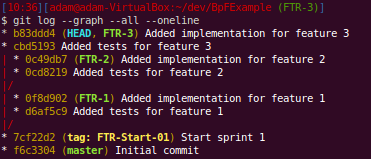
<p><img src="http://www.dymitruk.com/images/small-branches.png" /></p>

<p>You can see that the branches have a couple of commits each. We start with the end in mind with failing tests and implement the feature in the following commit. This would be the minimal amount of commits to expect on a typical feature. They won&#8217;t typically be that small.</p>

<!-- more -->


<h2>Integrate relentlessly</h2>

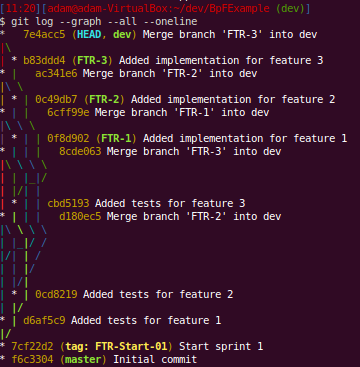
<p>They should be integrated into an integration branch almost as often as you commit to them. This gives feedback immediately. You have some sort of <a href="http://en.wikipedia.org/wiki/Continuous_integration">CI</a> running off of the integration branch to tell you if your changes are not adversely affecting other work. This gives you the immediate feedback of trunk-based integration while keeping your work organized and malleable.</p>

<p><img src="http://www.dymitruk.com/images/git-log-integration-branch.png" /></p>

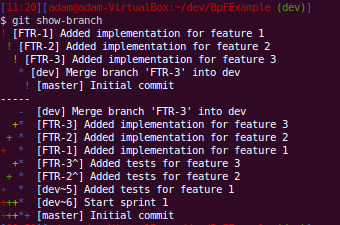
<p>You can follow the lines here but it&#8217;s not easy as you don&#8217;t get &#8220;swim lanes&#8221; for your branches. You can see each time that we merged a feature into dev by finding the &#8220;Merge branch &#8216;FTR-X&#8217; into dev&#8221;. We can use <em><a href="http://schacon.github.com/git/git-show-branch.html">git show-branch</a></em> to see what commits exist in what branches:</p>

<p><img src="http://www.dymitruk.com/images/git-show-branch-integration.png"/></p>

<p>Just a note that we usually make the commit messages prefixed with FTR-X which corresponds to a ticket in <a href="http://www.atlassian.com/software/jira/overview">Jira</a>. This way you know at a glance what feature a commit belongs to.</p>

<h2>Don&#8217;t do back-merges</h2>

<p>Or at least avoid them. A back-merge is where you want to use something from the integration branch to help you get your work done on the feature. This is a smell that you don&#8217;t have independent stories. A reasonable middle-ground is <a href="http://schacon.github.com/git/git-cherry-pick.html">cherry-picking</a>. A successfully cherry-picked commit will not cause you issues when you merge in the future.</p>

<p>Keeping a feature branch filled with commits that only attain what the feature is supposed to do will make working with it much more flexible. An understanding of the <a href="http://eagain.net/articles/git-for-computer-scientists/">DAG (directed acyclic graph)</a> that makes up Git history will make this easy to understand.</p>

<h2>Involve QA from the start</h2>

<p>This should not even be a contentious point anymore. We all know how important tight feedback loops are. There should not be a QA department with QA employees. QA should be a hat that is worn at different or same people at different times.</p>

<p>Knowing what your Acceptance Criteria is and how you will prove it from the start is integral to getting a lot of things gelling - including a successful branch-per-feature regiment.</p>

<p>A proper DSL a la Ubiquitous Language (see <a href="http://domaindrivendesign.org/">Domain Driven Design</a>) is at the heart of this. The tool that best communicates across to the Product Owner, Regression/Specification Testing and <a href="http://en.wikipedia.org/wiki/Behavior_Driven_Development">Behaviour Driven Design</a> feedback is currently <a href="https://github.com/adymitruk/storyteller">StoryTeller</a>. One thing that it offers that no other tools offer is communication to the person writing the Acceptance Tests of what the system is capable of doing with the smallest amount of friction caused by technology. You simply pick what you want to do by clicking on links, filling out text boxes and selecting from drop-downs. There is no guessing as to how a tool might interpret your free-form text with it&#8217;s regex and English-parsing goodness. More on this in a future post.</p>

<p>A feature passes QA only if it has been integrated with all the other features that are completed. This brings us to a very light weight branch called QA or RC (release candidate). Once a feature is finished, it gets integrated to the RC branch and <a href="http://www.jetbrains.com/teamcity/">TeamCity</a> or whatever CI tool you have makes a release build. This build upon being tested can throw this feature or any other back to development should they fail. Your CI tool/process will mark this with an incremented <em>Release Candidate</em> tag.</p>

<p><img src="http://www.dymitruk.com/images/release-candidate-branch.png" /></p>

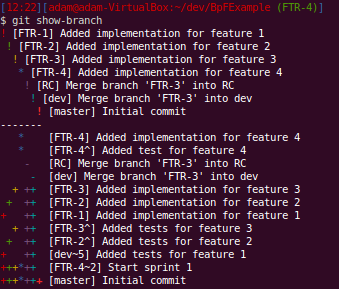
<p>You can see that that the incomplete feature 4 is not yet part of the release candidate branch.</p>

<p><img src="http://www.dymitruk.com/images/release-candidate-tags.png" /></p>

<p>Here you can list all that&#8217;s been merged into the release candidate.</p>

<h2>Share your hard work</h2>

<p>There will be conflicts when you merge. This is a fact of life when work is done by more than one person. When you integrate often from your feature to the integration branch, the conflicts you solve should be remembered. This is done by git&#8217;s <a href="http://progit.org/2010/03/08/rerere.html">rerere</a> but could be simulated in other systems with little effort. The key is to set up a way of sharing these auto-resolution conflicts to the rest of the team.</p>

<p>Now anyone that tries to integrate that feature and has that conflict will not have to resolve it. No dev required to put together a build. This is a manual share right now if needed. I should have the script published in about a week that does this behind the scenes. If you want to do it yourself, look no further than the .git/rr-cache folder in your repository. Simple synchronization between all devs is the bare minimum that is needed. Currently this is a branch that has it&#8217;s own branch with an independent root. Wrapping the git command to intercept fetch, pull and push makes it easy to update the rerere. Any git command can be made to look at an alternate folder for the work tree and the repository itself.</p>

<p><img src="http://www.dymitruk.com/images/conflict-resolution.png" /></p>

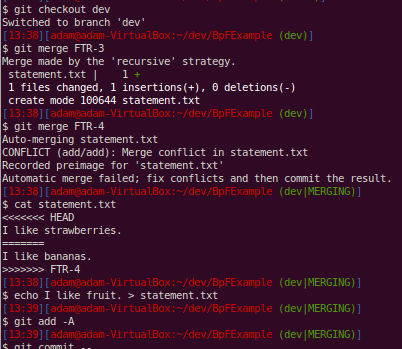
<p>Notice that the conflict has been marked and we resolve it by just rewriting the file to make both branches agree.</p>

<p><img src="http://www.dymitruk.com/images/resolution-recording.png" /></p>

<p>Here, since we had rerere enabled, git records how we resolved this particular conflict. This will help us when we get to the release candidate branch and other people&#8217;s work later on.</p>

<p><img src="http://www.dymitruk.com/images/resolution-storage.png" /></p>

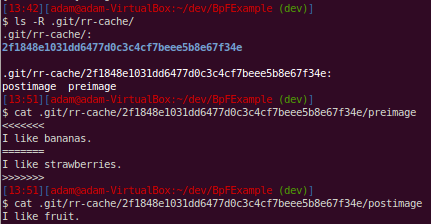
<p>When we examine the .git folder, we can see how the resolution is stored. Just like blobs, the pre-conflict image is what determines the SHA1 hash that is the name of the directory that the conflict resolution files will be stored under. The content of these files shows just how simple even advanced concepts such as rerere are when we look at how they are implemented.</p>

<p><img src="http://www.dymitruk.com/images/resolution-replay.png" /></p>

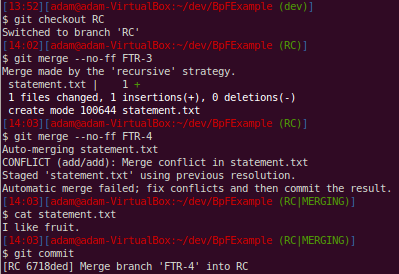
<p>Git now reuses our previous resolution when we had that conflict on the dev branch. It does not make this an automatic commit of the merge - just in case. We examine the file that was conflicted and are fine with it and go ahead and commit the merge.</p>

<p>I&#8217;ll share the script that I&#8217;m writing once it&#8217;s finished. The resolutions get shared across a &#8220;resolutions&#8221; branch in the same repository.</p>

<h2>Taking features out is more powerful than putting them in</h2>

<p>This might sound counter-intuitive. But at the end of an iteration, a feature that you thought was done may not work as the last bits of testing on the build as a whole make releasing a no-go. Anyone should be able to take out that feature and release anyway.</p>

<p>So the trick is not to take the feature out of the build. You make a build with the problem feature omitted. You can integrate that feature in the next iteration when there is time. Releasing a build should be painless.</p>

<p>Don&#8217;t make a build to test out of the integration branch. Make a separate branch that can be reset relentlessly and tag release candidates. Reset this branch to the start commit of your iteration and merge all the features you know work.</p>

<p>No conflicts. Remember rerere and the like? Anyone should be able to do this if you followed the practices here. This is &#8220;why&#8221; the hard work needs to be shared.</p>

<p>The key is we &#8220;threw away&#8221; all previous merges and have to redo them. But remembering our conflict resolutions, this is now a trivial matter. If in doubt, we haven&#8217;t really thrown them away, they are still there to reference or use. Git&#8217;s pick-axe functionality makes it really easy to find certain code changes if you don&#8217;t know where to look.</p>

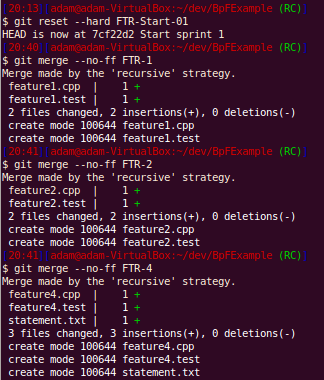
<p>Here we have decided that feature 3 is no good and we want to make a build without it:</p>

<p><img src="http://www.dymitruk.com/images/remake-release-candidate.png" /></p>

<p>Now we can see that feature 3 is not part of this release candidate:</p>

<p><img src="http://www.dymitruk.com/images/release-candidate-4.png" /></p>

<h2>Shared code</h2>

<p>You will quickly note how painful keeping shared code synchronized across the many applications that you have. This is usually handled by <em>git submodules</em>. If you don&#8217;t have explicit contracts between the shared libraries and your client applications, there is going to be a lot of work to ensure you have the right version deployed. Adhering to <a href="http://en.wikipedia.org/wiki/Open/closed_principle"> OCP (open closed principle)</a> is the only way out of this and buys the ability to have a rolling deployment. The preferred way is to have a submodule that contains all the messages needed to communicate in the system. You can enforce that only new messages get added with <a href="http://progit.org/book/ch7-3.html">server-side hooks</a> that will not allow existing messages to be modified or deleted - only new messages are allowed to be added.</p>

<h2>Giant refactorings</h2>

<p>Your work is as organized as is possible. Whether you elect to do this off of a certain point in time on the integration branch, release candidate branch or you started a feature branch for it, you have a way of tracking that work and can apply it as a merge, rebase or manual patch to another point if necessary. If there are large changes, we can do that work before we start on other features after a release. There is no magic bullet for refactoring across the board. Organized work and history help this - it doesn&#8217;t hinder it.</p>

<p>Any hardships that you may encounter will be tempered by the fact that you are relentlessly sharing your conflict resolutions and continuously integrating. <strong>PROPER BRANCH-PER-FEATURE RELIES ON RELENTLESS CONTINUOUS INTEGRATION</strong></p>

<h2>Toggles are a hack</h2>

<p>There are exceptions. You&#8217;re a giant company. You need to enable a feature for a small subset of early adopter users. This is now an explicit feature that&#8217;s important to business. That&#8217;s where we all want to be but most of us are not.</p>

<p>Having to make architectural changes because you can&#8217;t effectively organize your work is a process smell plain and simple. Some teams are not mature enough and this may be an OK solution temporarily.</p>

<h2>This is Git Flow Improved</h2>

<p>Most of this way of working started from the excellent post called <a href="http://nvie.com/posts/a-successful-git-branching-model/">&#8220;A Successful Git Branching Model&#8221;</a>. The important addition to this process is the idea that you start all features in an iteration from a common point. This would be what you released for the last one. This drives home the granular, atomic, flexible nature that features must exhibit for us to deliver to business in the most effective way. Git flow allows commits to be done on dev branches. This workflow does not allow that.</p>

<p>The other key difference is no back-merge into the feature. Otherwise, you will not be able to exclude this feature later in the iteration.</p>

<h2>It will be bad if you use old tools</h2>

<p>Not having a snapshot based history will hurt as branching is effectively copying another branch which will be slow. Not having a base of where the branch originated will make merging difficult as you do not have a base to compare how each side of development has changed. There are many other issues with having a connected-only tool to support what you do in order to work with everyone.</p>

<h2>We can always deploy</h2>

<p>The release candidate builds represent production ready deployable packages. This is the most responsible way of doing Continuous Deployment. We have the latest completed and tested feature at our disposal. We don&#8217;t ship any code that does not belong to a feature that&#8217;s passed QA and all other tests. Having this option gives you the best position as an IT department. Business has the power to deploy whenever it wants to - and have the piece of mind that nothing is half-baked to the best of anyone&#8217;s knowledge.</p>

<p><a href="http://www.dymitruk.com/old-comments-about-branch-per-feature.html">Old comments from Google+</a></p>
]]></content>
  </entry>
  
  <entry>
    <title type="html"><![CDATA[A Fresh Start: Octopress Provides the Tooling for Blogging]]></title>
    <link href="http://www.dymitruk.com/blog/2012/01/25/a-fresh-start-octopress-provides-the-tooling-for-blogging/"/>
    <updated>2012-01-25T22:03:00-08:00</updated>
    <id>http://www.dymitruk.com/blog/2012/01/25/a-fresh-start-octopress-provides-the-tooling-for-blogging</id>
    <content type="html"><![CDATA[<p><img src="http://www.dymitruk.com/images/cat-edit.jpg" /></p>

<p>This is the first post using Octopress (I have been editing it though to get some things working). So far it&#8217;s awesome. I&#8217;ll have more to show soon. Look for:</p>

<ul>
<li>Import old posts from adventuresinagile.blogspot.com</li>
<li><del>Customize the front page to include my password hasher.</del> My password generator is <a href="http://www.dymitruk.com/password.html">here</a>.</li>
<li>Articles and other demo stuff</li>
</ul>

]]></content>
  </entry>
  
</feed>